| AIDS before Us ★ |

Brilliantly executed concept with meticulous attention to details.
Update: The one with Hitler appeared briefly in Yahoo! News’ Most Emailed Photos.
| AIDS before Us ★ |
Brilliantly executed concept with meticulous attention to details.
Update: The one with Hitler appeared briefly in Yahoo! News’ Most Emailed Photos.
| Art & Copy ★ |
Noble ideas, somewhat difficult to meet in real life.
Advertising, in fact, may actually be an innately human act itself. But like all creative endeavors (books, paintings, movies, architecture) most of it is mediocre.
“Art & Copy” Film: Ad Geniuses Have Their Say
Something cool for an unusual campaign.

| 09.09.09 ★ | youtube.com |
Leica, we’re counting on you to stir up the industry, they’re all gotten pretty comfortable recently, and we need some competition going.
It’ll will probably the world’s busiest Wednesday, among others:
The movie, 9 directed by the acclaimed Tim Burton aimed to open a new era in animated storytelling.
Wordwide Moment for PEACE 09.09.09, GMT+9 at 09:09AM.
Apple‘s Sept 09 “rock and roll” Event – New iPods, anyone?
Not to say about all the wedding RSVPs that you made?
| 7 is Canon’s new lucky number, 18 is not. ★ |
Yes, they finally did something ambitiously bold that captured our heart with their new EOS 7D, but their decision to go with a higher megapixel (smaller pixel size) cropped sensor is not a smart move, higher megapixel count means smaller pixel pitch & lacking that full-frame feel.
At all ISO increments, other than the very lowest ones, pictures can take on a slightly harsh appearance not present in larger-pixel cameras in Canon’s lineup, such as the EOS-1D Mark III, or Nikon’s D3 and D700.
While on the other hand, just last week, Canon introduced the new Canon G11 & the PowerShot S90 that has less megapixel than its predecessor but increases their high ISO performance & Low Light Sensitivity. I could only see this as a brilliant move, Canon should consider applying this paradigm to the DSLR development roadmap.
This means that overall, 7D image quality is shaping up to be very good. If weighted against how minuscule its sensor’s pixels are, image quality is astounding. Put in charge of the 7D’s development, however, we’d have chosen something like a 12MP sensor with better high ISO performance and richer low ISO files.
Rob summed up my sentiment nicely on this:
Put in charge of the 7D’s development, however, we’d have chosen something like a 12MP sensor with better high ISO performance and richer low ISO files.
Rob Galbraith DPI: Canon announces 17.92 million image pixel, 8fps EOS 7D
In Winter 1998, I enrolled into a Basic Computer Programming class during my Architecture Study in Tongji University, Shanghai, it wasn’t a required class, but it was my passion to computers and my curiosity about coding that sparks my interest.
The class was conducted in a medium-sized computer lab, where dozens of IBM PCs running Windows 95 were laid-out on every table in the room. There were not much interaction between each students and the teachers, he/she would narrate the content of the book—that we also read—and typed in the code for every bit of example snippet that demonstrate each functions.
One of the first program that we ought to write (or copy, to be more accurate) was a simple image display app. Screenshots of each step accompanied every corresponding code snippet/functions that were required to construct the entire app, the theory is, if you follow the book completely, you should have a working executable within 40 minutes. The teacher was kind enough to stretched the time to 120 min. 2 hours later, I have finally completed the executable, and proudly demoed it to the teacher. Only one problem: none of the function actually worked.
Instead of typing in the codes, I was busy redesigning the program’s interface completely, instead of listening to the teacher’s instruction, I was still busy decorating the program’s canvas with screen readable typeface (chinese characters has a different screen characteristic & size ratio). I was the only architecture student in the lab, and they all were amused with what I have produced, that was the last time I was in that class.
So that should illustrate my degree of fluency with computers; however technical or computer adept I have become, programming is not in my blood, I have always been a designer first, hacker later.

Coming into the 6th month since the first official post of this blog, there have been numerous minor & major upgrades behind the scene. I am by no means a web wizard, but like many others, I can copy & paste codes just fine; throw me in some samples, I should be able to hack my way into things. The web today is a complicated business, what was HTML then, it is now XHTML, AJAX, CSS, PHP, Ruby, jQuery, etc., and it keeps growing every second. But I’m not gonna go there right now, I’d just like to highlight a few additions to this blog since it’s gone live about six months ago.
This blog is maintained with the often limited but excellent WordPress web publishing platform powered by GraphPaperPress’ excellent theme engine. It’s a blog oriented system with a wide community base and large plug-ins support, it is neither a photo gallery app nor a full-blown content management system, but with a little extra work it can morph into any kinds of website, including a photo showcase/photoblog/page oriented website like the one you are reading now. Contrary to common perception, this blog is running solely on a single install base of WordPress despite its multifaceted nature; all gallery entries, blog articles & link posts are created from a standard WordPress posts, using a combination of specific page templates, categories & tags, navigational structures are constructed surrounding the cloud to divide the site into several different sections—like the one you see above (Home, Portfolio, Projects, Movies, Workshop, Blog, Contacts) as simple as it looks, it required a lot of trick to make the navigation scenario as natural, as simple as possible.
As you can see from the picture above, the Blog section now features two additional sections, Original Articles and Linked List, these two rounded up how I’d hope the Blog section should be, together with the Posts Archive page that I have put up months earlier. With that added, you can now browse individually between the longer, original piece that I wrote, or the shorter, more frequently updated of the Linked List—things I have discovered around the web that I find to be interesting/relevant to the soul of this blog. While the Posts Archive is a straightforward flat list index of every single posts on this blog, including entries to the Portfolio section.
Having to write mostly in English, a considerable percentage of the visitors of this blog come from non-english speaking countries, Google Translate or similar services would occasionally appear in the blog’s visit log, so to do justice, I also decided to add the translation tool from Google in the sidebar of the blog’s main page.
What separates the gallery from the other post is the content it entails, a gallery post is a series of photographs attached in the body of a WordPress post, driven by an AJAX-based image display plug-ins, automatically displayed as gallery using the
shortcode; the one that I’m using is the Galleria WP by Y2 (Yokoyama Yasuaki).
A second type of gallery post is where a blog contains an image, by default, when a post has an image attached to it, WordPress will provide a link to the original image file that opens on a separate browser window/tab. I don’t like that, so I installed a second image display plug-in called Shutter Reloaded that modifies this behaviour, instead of an empty window, the plug-in will create an overlay frame wrapping around the image with a darken edges in the same page, upon clicking the image, the translucent layer will disappear, taking you back to the same page view.
WordPress has an excellent RSS publishing engine, it can automatically create RSS feeds for each categories/tags/posts on-the-fly, problem is, it generates text output with a limited excerpt rendering engine (problem 1), and for more serious writers that uses footnotes & lots of linking, there’s no easy way of doing it smartly (problem 2)
I solved problem 1 with one of the excerpt plug-in, the one that I found suitable for this blog was the Advanced Excerpt, not only it modifies the RSS output, it also improves posts excerpt with a considerable amount of personalization.
An answer to my problem no. 2 was the FD Footnotes, which among other footnote plug-ins was most suitable to my taste.
The Inquiries page generates an e-mail to be sent to my address of choice using the Contact Form plug-in by Takayuki Miyoshi. Embedded movies are attached to each post with the help of the Viper’s Video Quicktags, Social linking tool is provided by the Tweet This, Socialite, Publish to Facebook and the Facebook/Twitter Status Updater and WPBook Facebook embedding plug-in.
As the site’s design takes to its final shape, I began shopping for a caching solution (WordPress is known to crash upon a huge influx of traffic–see below). I revisited WP Super Cache, and the latest updates brings total compatibility with my theme and plugins used currently, as of yesterday 08:00am the blog is serving you dynamically generated HTML cache of the original PHP version. If you run a blog and happen to use WordPress, Super Cache is a must-have if you want to run a secure & stable WP powered site.
Behind the scene, the WordPress administration interface is nip/tucked with Ozh’ Admin Drop Down Menu. Drag & drop page management enabled with the addition of pageMash and HeadSpace2 custom-manages the meta-data to help with search engine optimization. To facilitate backup/restore, WordPress Database Backup, WP-DBManager would come to the rescue shall anything goes wrong, while WP No Category Base and YARPP related posts plug-in helps you find articles/contents easier.
There are much that can be improved with this site, but my hands & time are required somewhere else offline, I’d rather spend my free time creating content rather than busy building machines that generates it, I’d rather drink my coffee and sleep like a baby rather than being sleepless hacking codes. But as far as blogging & photography are concerned, they are the two that keeps me sane dealing with the insanity of our daily lives.
update:

Excellent work by Chinese Photographer Feng Fang Yu
View Gallery: May Rain (梅雨)
Weighing in less than 0.5 kg, the package arrived late Friday afternoon. Apparently they don’t deliver on weekends, so accompanied by a friend I decided to head over to DHL’s storage facility, and self-collect the package instead. That was the beginning of what will become a very exciting weekend.
Announced just a year ago by CEO Steve Jobs, Apple set a date for September release; but being Apple they just couldn’t wait and deliver Snow Leopard almost 1 month early on August 28th last week, the news came fast too, no big press gathering, no big launch party, just a humble notice over at their online store a few days before the launch date saying that Snow Leopard is available for pre-order, shipping Aug 28th. The blogosphere went mad, tech geeks, writers & bloggers tweet, write and reviewed this different kind of OS upgrade, people loved it, and I can’t wait for myself to put my hands on it, did, and now I can see what the fuzz is all about.
How unusual Snow Leopard as an OS upgrade is? Well, let’s start with the big news. Rather than adding new features, they wanted to stick with the existing ones (Leopard has enough of that, really) and decided to do what others never done before, what others promised and failed to deliver: faster, smaller & more reliable OS. Boy, they did it. They did it marvelously; 1 month earlier than promised, $100 less than its predecessor with countless improvements across the board.
We photographers live & die with our machines, it’s the air that we breath, the food we eat & the constant companion that never betrays, along the way, we picked up a couple of things or two to complement our machines to help us live better, do a better job, so we depend on those Apps also. Being impatient kills in this industry, and only those who are crazy enough (like me) will dare to take the risk, but they said no risk, no gain, right?
Lucky enough, there are people who were there first, those bloggers I was talking about? They’ve been running & testing Snow Leopard for months much earlier than the rest of us, Apple gave them access to new beta/test builds since the day it was announced, and some of the have been posting their thoughts, reports & findings for the world to see. Lovely. Days prior to the launch, Macworld, the ivy-league publication of the Mac posted many useful things, some dedicated group reported and lists Snow Leopard Apps Compatibility, Apple also published a simpler version of similar list but only the incompatible ones, while Macrumors put together links to Snow Leopard compatible official printer drivers .
With the preflight checks off, I’m all set and Snow Leopard is cleared for landing.
First Impressions
Snappy, snappy, snappy.
With a smaller install base and shorter installation time, this new OS is indeed faster (especially with 64-bit capable, Core 2 Duo machines) by all measures; visual effects, graphic animations, UI interactions all feels snappier. Upon my first restart, a quick check on my Macintosh HD shows 17gb more disk space available before installation began on my old 10.5.8 Leopard install, while retaining my old system’s custom settings & addons–this may have something to do with Snow Leopard’s new disk space calculation method, but it’s always a good thing when we see more space remaining on our drive regardless of the calculation method.
Snow Leopard’s new Gamma setting (2.2, old one was 1.8) gives a slight boost in overall contrast across the desktop without loosing too much shadow integrity & saturation, this means that you have a closer image rendition to your Windows-using printer vendor.
Next is the Finder. Along in its list of refinements are the big rewriting of the Finder, it’s now a fullyCocoa based App like the rest of Apple’s default. Changes are almost invisible outside, Apple made sure of that, but it’s a totally different story under the skin.
Spaces
Without the luxury of a second, or third display, I relied heavily on Spaces’ to manage my workspace. Mail & Safari on Space 1, Writing & Blogging App on Space 2, Imaging Apps on Space 3, Windows Visualization on Space 4, etc. Yet, it often breaks rather than improving my overall workflow, this writeup by John Gruber will explain how frustrating Spaces can become. This problem, however, may not be Apple’s after all, being the application that experiences difficulties dealing with Spaces are those behemoth coming from Redmond & San Jose, California., the overall behavior of Spaces is largely improved in Snow Leopard, not only it’s snappier, but animations & movements appear more liquid and solid than before.
What about Graphics?
Snow Leopard sports an integrated RAW image format support for major camera manufacturers, not only that I need not to install Nikon View for the Mac to recognized Nikon’s NEF format, rendering speed has been vastly improved. Opening a full-size D700 RAW file in Preview takes less than a second (it usually takes about 3-4 seconds previously with my leopard):
Snow Leopard supports RAW image files from over a hundred digital camera models from most major manufacturers, including Canon and Nikon. By using the GPU-accelerated pixel processing capabilities of Core Image, Snow Leopard lets you quickly view your RAW images in the Finder, Quick Look, and Preview without plug-ins or additional software.
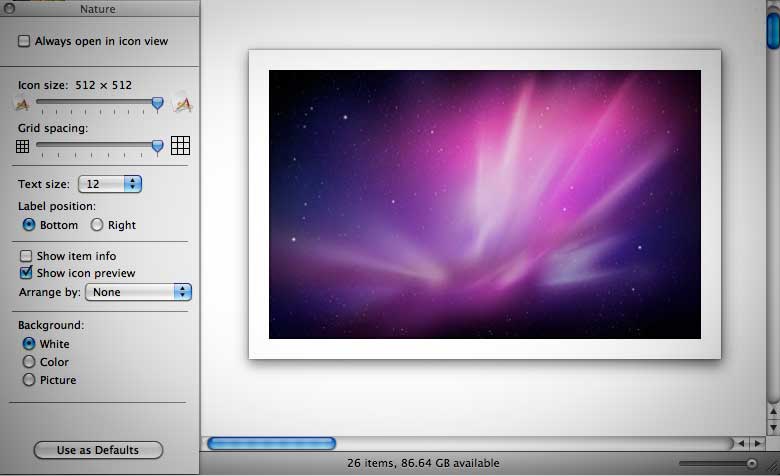
A quick test with RAW files from Canon, Ricoh & other manufacturer showed consistent results, brilliant previews with accurate color rendering are displayed with a blazing speed; combined with the new Cocoa-based Finder, icons can now displayed up to 512 pixels, which means that you no longer need to rely heavily on image management app for editing your photographs, just adjust the icon size from the new icon size slider on the bottom-right edge of a Finder’s window and you’re Finder is your new light-table!
Another small improvements in Finder, is the ability to ‘Put Back’ deleted files right where it belongs, I have problems in the past in deleting duplicated backup files/folders and not being able to restore it back to its original parent folder, this solves that particular annoyance.
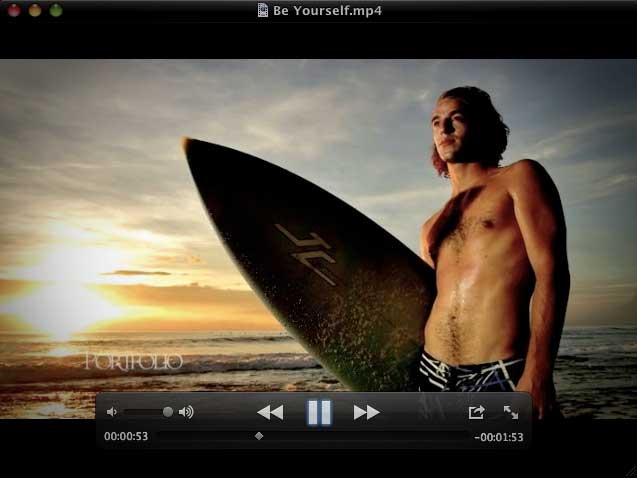
The new Quicktime X is also an awesome upgrade, it no longer requires registration to unlock some of the Pro features, and the HUD styled UI is amazingly clean & fun to interact with.
3rd party App Compatibility
As the list suggested, major apps are compatible with Snow Leopard, I have yet to record any crash/problems with Apple Aperture, Adobe CS4, Expression Media, iLife, TechTool Pro 5, etc. Those of you who rely on some 3rd party add-ons/plug-ins might have to wait for a bit before everything’s back to normal.
Due to the 64-bit nature of most Apple’s built-in Apps, none of the existing plug-ins seem to work in Snow Leopard (e.g. Safari’s GreaseKit, WideMail, including those of SIMBL/InputManager based plugins).
By the end of the day, this is an upgrade like no others, Snow Leopard has shown that reliability, speed & refinements are the most important & relevant upgrades a technology consumer can ever get, features are nice, but only as good as how well & easy it works for the users, this could spur a different trend in future developments where other industry could also learn a thing or two, including how to put a price tag on technology.
As a finishing touch, Snow Leopard now has the capability to set time zone automatically based on your location (good news for traveling photographers) & let application minimize to the original icon dock, instead of next to the trash can (good news for power users), these are one of those tiny features that makes up big time.
update:
Nikon USA just issued a statement urging users of Nikon’s proprietary imaging software not to upgrade:
Initial testing of Nikon software with Apple’s new “Snow Leopard” Mac OS 10.6 indicates that there are incompatibilities with Nikon Capture NX 2, Nikon View NX and Nikon Scan, users of these applications should not upgrade their OS at this time. When more compatibility information is available it will be posted on the Nikon web site.
Head over to Ars for an extensive review about Snow Leopard.
P.S. Head-2-Head Blog has a related piece, go check it out.

PARIS—A fashion show,
2006 © Gueorgui Pinkhassov / Magnum Photos
| Traditional news is a huge waste of everyone’s time ★ |
I’ve been off newspapers for years and been living without cable (TV) for more than a year. Local (air) TV does not exist to me.
He’s in. I know many who are. Are you in? Consider this, why?
Jump to baekdal’s blog.